
Validation Errors
Runtara checks a workflow every time you save it. The check finds problems that would make the workflow fail or behave unexpectedly, and reports each one with a code:
- Errors (codes starting with E) stop the save. The workflow keeps its last saved version until you fix them.
- Warnings (codes starting with W) do not stop the save. They point at settings that are ignored, risky, or easy to misread.
Where you see them
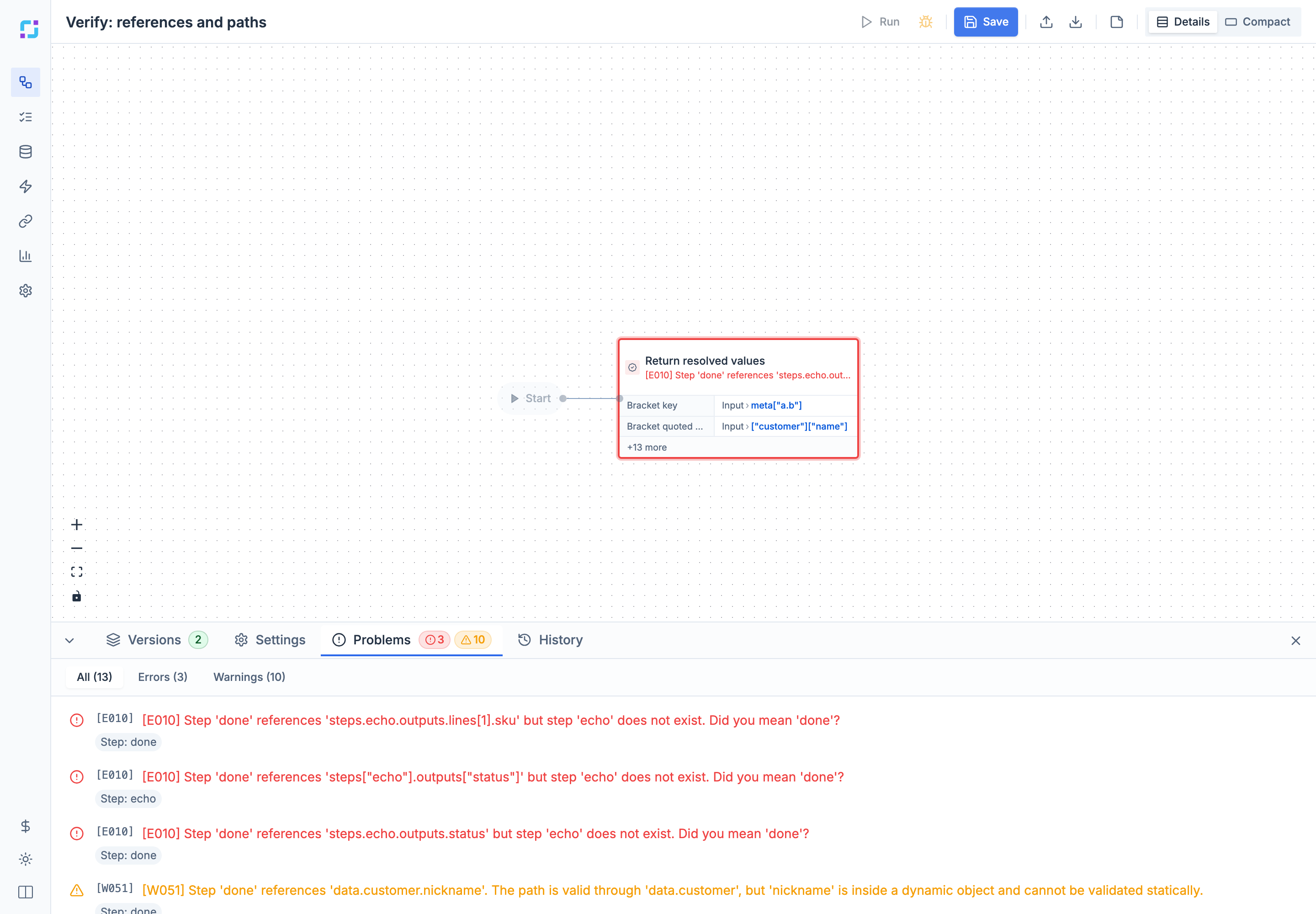
- In the editor, the Problems tab in the bottom panel lists every message from the last save. Filter by All, Errors, or Warnings, and select a message to jump to its step. The step’s card is outlined in red on the canvas.
- Through the API and MCP, saving a workflow returns the same codes in
validationErrorsandwarnings. To check a definition without saving it, send it toPOST /api/runtime/workflows/graph/validate.
Every message starts with its code in brackets and names the step, for example:
[E010] Step 'done' references 'steps.echo.outputs.status' but step 'echo' does not exist. Did you mean 'done'?Many messages end with a suggestion, such as the closest valid name or the list of allowed values.
All codes
| Code | Severity | Problem |
|---|---|---|
| E001 | Error | Start step does not exist |
| E002 | Error | Step can never be reached |
| E003 | Error | Finish step is not connected |
| E004 | Error | Workflow has no steps |
| E008 | Error | Schema field name used twice |
| E010 | Error | Reference to a missing step |
| E011 | Error | Reference path is malformed |
| E012 | Error | Reads a step that runs later |
| E013 | Error | Unknown variable referenced |
| E014 | Error | Connection points to a missing step |
| E020 | Error | Unknown agent |
| E021 | Error | Agent has no such capability |
| E022 | Error | Required input is missing |
| E023 | Error | Fixed value has the wrong type |
| E024 | Error | Value is not an allowed option |
| E025 | Error | Condition is not in the expected shape |
| E026 | Error | Agent needs a connection |
| E027 | Error | Operator only works in queries |
| E028 | Error | Waiting step must be durable |
| E029 | Error | Suspending step has no timeout |
| E050 | Error | Child workflow version is invalid |
| E051 | Error | Input field is not declared |
| E052 | Error | Inputs used without an input schema |
| E053 | Error | Variable is not defined |
| E054 | Error | Child workflow accepts no inputs |
| E055 | Error | Child workflow inputs are missing |
| E056 | Error | Workflows embed each other in a loop |
| E058 | Error | Reference names a field that does not exist |
| E059 | Error | Reference reads inside a non-object value |
| E060 | Error | Two steps share the same name |
| E070 | Error | Conditional edges share the same priority |
| E071 | Error | More than one fallback edge |
| E072 | Error | Conditional step edge is not true/false |
| E073 | Error | Parallel branches never join back together |
| E100 | Error | Step is missing its configuration |
| E110 | Error | AI Agent has duplicate tool names |
| E111 | Error | AI Agent tool name has invalid characters |
| E112 | Error | AI Agent has no LLM connection |
| E113 | Error | AI Agent has more than one memory |
| E114 | Error | Memory edge points to a non-Agent step |
| E115 | Error | Memory configured but no memory provider |
| E116 | Error | Memory provider connected but not configured |
| E117 | Error | Workflow output has no name |
| E118 | Error | Workflow output has no value |
| E120 | Error | MCP toolset edge points to a non-Agent step |
| E121 | Error | MCP toolset edge points to wrong agent |
| E122 | Error | MCP toolset edge has no name |
| E123 | Error | Two MCP toolsets share a name |
| E124 | Error | Embedded child workflow not found |
| E125 | Error | Embed step ID used more than once |
| E126 | Error | Reference starts with an unknown root |
| E127 | Error | Loop reference used outside its loop |
| E129 | Error | Retry count is too large |
| E130 | Error | Step key does not match step ID |
| E131 | Error | Waiting step in an unsupported place |
| E132 | Error | Control step in an unsupported place |
| E133 | Error | Invalid WaitForInstances run list or timeout |
| E134 | Error | State step without a state schema |
| E135 | Error | SetState writes an undeclared field |
| E136 | Error | Step id reserved for error context |
| E137 | Error | Variable name reserved by the runtime |
| E138 | Error | Graph shape the compiler cannot build |
| E139 | Error | Conditioned edges have no default edge |
| E140 | Error | Conditional step is missing a branch |
| E141 | Error | Routing Switch has no default edge |
| E142 | Error | onError edge from an unsupported step |
| E143 | Error | Edge label the step never routes on |
| E144 | Error | Parallel branch leaves before merging |
| E145 | Error | Delay step in a non-durable workflow |
| E146 | Error | Split or Switch has no config |
| E147 | Error | Duration is not a number of milliseconds |
| E148 | Error | Template value has a syntax error |
| E149 | Error | Error handlers are nested too deep |
| E150 | Error | Variable value does not match type |
| E151 | Error | Field condition has no comparison value |
| W003 | Warning | Step ends the workflow without Finish |
| W020 | Warning | Unknown input for this agent capability |
| W030 | Warning | Retry count higher than recommended |
| W031 | Warning | Retry delay longer than one hour |
| W033 | Warning | While loop iteration limit is very high |
| W034 | Warning | Loop timeout longer than one hour |
| W040 | Warning | Duplicate normal and error edge to one step |
| W050 | Warning | Step reads its own outputs too early |
| W051 | Warning | Path can’t be checked inside an open object |
| W052 | Warning | Template reads a field that is not declared |
| W053 | Warning | Error context read through a deprecated spelling |
| W072 | Warning | onWait never runs for AI agent tools |
| W073 | Warning | Split parallelism may not run concurrently |
| W074 | Warning | Fixed run label reused inside a loop |
| W075 | Warning | Control step forces parallel work to serialize |
| W076 | Warning | Enclosing retry replays a control operation |
| W077 | Warning | Workflow to start is not a fixed id |
| W078 | Warning | Timeout too short for the step to wait |
| W080 | Warning | Data reference in a loop cannot be checked |
| W081 | Warning | State schema setting has no effect here |
| W082 | Warning | State is not published in non-durable workflows |
| W083 | Warning | Embedded workflow state stays inside the child |
| W084 | Warning | Workflow-wide setting ignored in a nested graph |
| W085 | Warning | Error context has no such field |
| W086 | Warning | Unknown key in the definition is dropped |
| W087 | Warning | Sequential setting overrides Split parallelism |
| W088 | Warning | WaitForSignal poll interval is ignored |
| W089 | Warning | Field visibility condition can never match |
| W090 | Warning | Reference inside a fixed value isn’t resolved |
| W091 | Warning | Zero timeout means different things by step |
| W092 | Warning | Routing Switch case has no route |
| W093 | Warning | Deprecated field spelling is still accepted |
Workflow structure
How steps connect: the start step, edges, branches, and merges.
E001: Start step does not exist
Error. The workflow says it starts at a step id that is not in the workflow, so there is nowhere to begin.
Fix: Set the start (entry point) to the id of an existing step, or rename the step to match.
Example: [E001] Entry point 'start' not found in steps. Available steps: done
E002: Step can never be reached
Error. No path from the start step leads to this step, so it would never run.
Fix: Connect an edge from an earlier step into it, or delete the step.
Example: [E002] Step 'orphan' is unreachable from the entry point
E003: Finish step is not connected
Error. A Finish step exists but no edge leads to it; inside a Split iteration this silently makes the result null.
Fix: Add an edge that ends at this Finish step, or delete it.
Example: [E003] Finish step 'spare' is defined but not reachable from entry point 'a'. Without an executionPlan edge ending at 'spare', the workflow (or Split iteration) silently returns null. Add an edge ending at 'spare' (the executionPlan currently has 1 edge(s)), or remove the step.
E004: Workflow has no steps
Error. The workflow (or a loop body) contains no steps at all, so there is nothing to run.
Fix: Add at least one step; the simplest valid workflow is a single Finish step.
Starting a workflow version with no steps also fails with this code, before the run begins.
Example: [E004] Workflow has no steps defined
E014: Connection points to a missing step
Error. An edge in the execution plan starts or ends at a step id that does not exist.
Fix: Delete the dangling edge, or correct its fromStep/toStep to an existing step id.
Example: [E014] Execution plan edge 'ghost' -> 'done' references fromStep 'ghost', which does not exist in steps. Did you mean 'done'?
E060: Two steps share the same name
Error. Step names must be unique within a workflow so they can be told apart in the editor, logs, and run history.
Fix: Rename one of the steps.
Example: [E060] Multiple steps have the same name 'Look up order': a, b
E130: Step key does not match step ID
Error. In the workflow JSON, each step’s key in the steps map must equal the step’s own id field.
Fix: Set the step’s id to the same value as its key in the steps map.
Example: [E130] Graph "<root>": step map key "a" differs from step.id "lookup"; set step.id to the map key
E070: Conditional edges share the same priority
Error. When a step has several conditional outgoing edges on the same label, they are checked in priority order, so two with the same priority leave the order undefined.
Fix: Give each conditional edge from that step a different priority.
Example: [E070] Step 'a' has multiple '(default)' edges with the same priority 1. Conditional edges must have unique priorities. Targets: x, y
E071: More than one fallback edge
Error. A step that routes by conditions (or by a label such as onError) can have only one edge without a condition, which acts as the fallback when nothing else matches.
Fix: Keep a single unconditioned edge from that step, and add conditions to the others.
Example: [E071] Step 'a' has multiple '(default)' edges without conditions. At most one default (condition-less) edge is allowed. Targets: y, z
E072: Conditional step edge is not true/false
Error. A Conditional step can only leave through edges labeled ‘true’ or ‘false’, and those edges must not carry their own condition or priority; the step’s own condition picks the branch.
Fix: Label the edge ‘true’ or ‘false’ and move any edge condition or priority into the Conditional step’s condition.
Example: [E072] Conditional step 'check' has invalid edge to 'y' with label '(default)': Conditional steps route only through edges labeled 'true' or 'false'; put the predicate in the step.condition, not in edge.condition.
E073: Parallel branches never join back together
Error. When a step has several unconditioned outgoing edges, all of them run in parallel; if those branches end separately, the workflow has more than one result.
Fix: Join the branches at a single step before finishing, or add conditions so only one branch runs.
Example: [E073] Step 'a' fans out to parallel branches that never re-converge: b, c. Unconditional parallel branches all execute, so non-merging branches produce more than one independent exit (an ambiguous result). Re-join the branches at a single merge step, or make the edges conditional so exactly one runs.
E139: Conditioned edges have no default edge
Error. A step only has conditional exits, so when none of the conditions match there is nowhere for the run to go.
Fix: Add one more edge from the step with no condition, to be taken when none of the conditions match.
Example: [E139] Step 'a' has conditioned edges but no unconditioned edge to follow when none of the conditions match. Add one default edge.
E140: Conditional step is missing a branch
Error. A Conditional step needs both a ‘true’ and a ‘false’ exit, and one of them is missing.
Fix: Add the missing edge labelled ‘true’ or ‘false’ from the Conditional step.
Example: [E140] Conditional step 'c' has no 'false' edge. A Conditional needs both a 'true' and a 'false' edge.
E141: Routing Switch has no default edge
Error. A Switch that routes to different branches has no ‘default’ exit for values that match none of its cases.
Fix: Add an edge from the Switch labelled ‘default’.
Example: [E141] Routing Switch 's' has no 'default' edge for values that match no case. Add an edge labelled 'default'.
E143: Edge label the step never routes on
Error. An edge carries a label that its source step never routes on, so the edge would never be followed.
Fix: Change the label to one the message lists (for most steps ‘next’ or ‘onError’, for a routing Switch its route names or ‘default’), or remove the label.
Example: [E143] Edge label 'success' on Agent step 'a' is not one it routes on. Use one of: next, onError.
E144: Parallel branch leaves before merging
Error. Steps that run in parallel must all reach the same merge point, but one branch has a conditional exit that leaves the parallel section early.
Fix: Remove the conditional exit from the branch and do the conditional routing after the merge step.
Example: [E144] Parallel branch step 'c' (fanned out from 'a') has a conditioned exit. Branches of a fan-out must run straight to their merge point; route conditionally after the merge.
W003: Step ends the workflow without Finish
Warning. A step that is not a Finish step has no outgoing edges, so the workflow stops there without returning any output.
Fix: Connect the step to a Finish step (or to the next step) so the run returns a result.
Example: [W003] Step 'a' (Agent) has no outgoing edges but is not a Finish step. The workflow will terminate here without explicit output.
W040: Duplicate normal and error edge to one step
Warning. A step has both a normal edge and an error edge pointing at the same next step, so the workflow goes there whether the step succeeds or fails and the error edge does nothing.
Fix: Delete one of the two edges, or point the onError edge at a real error-handling step.
Example: [W040] Step 'a' has two edges to 'done' differing only in label (next, onError). The duplicate is redundant — keep one and remove the other.
Error handlers
Routes that run when a step fails.
E142: onError edge from an unsupported step
Error. An onError edge starts at a step type that cannot hand its failures to an error handler, such as Filter, Conditional, Switch, Delay or Finish.
Fix: Remove the onError edge, or attach the handler to a step type that supports it (Agent, AI Agent, EmbedWorkflow, Split, While, WaitForSignal, WaitForInstances, SetState or GetState).
Example: [E142] Filter step 'f' cannot route failures through onError. onError edges are supported on Agent, AiAgent, EmbedWorkflow, Split, While, WaitForSignal, WaitForInstances, SetState and GetState steps.
E149: Error handlers are nested too deep
Error. Error handlers that have their own error handlers are nested more than four levels deep, or a chain of handlers loops back to a step already in it.
Fix: Flatten the chain so handlers nest at most four levels, and make sure no handler leads back to a step that is already handling the same error.
Example: [E149] The onError handlers of step 'a' nest more than 4 levels deep (handlers whose steps have their own onError handlers). Flatten the chain.
E136: Step id reserved for error context
Error. The step ids ‘error’ and ‘__error’ are reserved: inside onError handlers they refer to the error details, so a step with that id would have its output hidden.
Fix: Rename the step to something else, such as ‘report_error’.
Example: [E136] Step id 'error' is reserved: inside onError handlers `steps.error` is the error context, so this step's output would be replaced. Rename the step.
W053: Error context read through a deprecated spelling
Warning. The error-handling step reads the error through an old spelling (error.* or __error.*) that still works today but will be removed in DSL 4.0.
Fix: Use steps.__error.
Example: [W053] Step 'handler' references the onError error context via 'error.message', a deprecated spelling that still resolves. Use the canonical 'steps.__error.message' instead; DSL 4.0 removes the other spellings.
W085: Error context has no such field
Warning. The error-handling step reads a field the error never has (usually a typo), so it is always null.
Fix: Use one of the listed field names, such as steps.__error.message.
Example: [W085] Step 'handler' references 'steps.__error.mesage', but the error context has no 'mesage' field, so it resolves to null. Known fields: code, message, category, severity, retryable, retryAfterMs, attributes, details, context, stepId, stepName, stepType, agentId, capabilityId, childWorkflowId, childError, missingInputs.
References and data
Paths that read inputs, variables, and step outputs. See the Mapping reference for the syntax.
E010: Reference to a missing step
Error. A mapping reads from a step id that does not exist in this graph.
Fix: Correct the step id in the reference (the message suggests the closest match), or add the missing step.
Example: [E010] Step 'done' references 'steps.lookup.outputs' but step 'lookup' does not exist. Did you mean 'done'?
E011: Reference path is malformed
Error. The reference path cannot be parsed, for example an opening bracket with no closing bracket.
Fix: Fix the path syntax, e.g. data.items[0] or data.items.name.
Example: [E011] Step 'done' has invalid reference path 'data.items[abc': unterminated bracket (missing `]`)
E012: Reads a step that runs later
Error. A step uses the output of a step that only runs after it (or on a different branch), so that output does not exist yet.
Fix: Reference only steps upstream of this one, or move the step so the one it reads runs first.
Example: [E012] Step 'a' references step 'b' which has not executed yet. Steps can only reference outputs from steps that execute before them.
E013: Unknown variable referenced
Error. A mapping reads a variable that is not declared in the workflow and is not a built-in.
Fix: Declare the variable under variables, or fix the name in the reference.
Reported together with E053 for the same reference. The built-in variables _workflow_id, _instance_id, and _tenant_id are always available.
Example: [E013] Step 'done' references unknown variable 'currency' Available variables: _tenant_id, _instance_id, _workflow_id
E053: Variable is not defined
Error. A step reads a workflow variable that is not defined.
Fix: Add the variable under variables, or correct the name in the reference.
Reported together with E013 for the same reference.
Example: [E053] Step 'done' references 'variables.currency' but variable 'currency' is not defined Available variables: _instance_id, _tenant_id, region, _workflow_id
E051: Input field is not declared
Error. A step reads a run input field that the input schema does not declare.
Fix: Add the field to the input schema, or fix the name in the reference (the message suggests the closest match).
Example: [E051] Step 'done' references 'data.customerId' but field 'customerId' is not defined in inputSchema. Did you mean 'customer_id'? Available fields: customer_id
E052: Inputs used without an input schema
Error. A step reads run inputs (data.*) but the workflow has no input schema, so no input fields are defined.
Fix: Add an input schema that declares the fields the workflow reads.
Example: [E052] Step 'done' references 'data.customer_id' but no inputSchema is defined. Add an inputSchema to define expected input fields.
E058: Reference names a field that does not exist
Error. A reference points into an object whose fields are known (from the input schema, a variable, or a step’s output schema), and the field it names is not one of them.
Fix: Pick one of the available fields listed in the message, or add the field to the schema it comes from.
Example: [E058] Step 'done' references 'data.customer.phone' but 'data.customer' has no field 'phone'. Did you mean 'name'? Available fields: email, name
E059: Reference reads inside a non-object value
Error. A reference tries to read a field from a value that is known to be a plain value (for example a string or number), so there is nothing to look inside.
Fix: Reference the value itself (drop the extra field), or change the schema so the value is an object with that field.
Example: [E059] Step 'done' references 'data.name.first' but 'data.name' is 'string' and cannot be traversed to 'first'
E126: Reference starts with an unknown root
Error. References must start with a known root (data, variables, workflow, steps, iteration, loop, or item); any other start would silently resolve to nothing.
Fix: Start the reference with one of the listed roots, for example data.name instead of input.name.
Example: [E126] Step 'done' references 'input.name' but 'input' is not a recognized reference root. Legal roots: data, variables, workflow, steps, iteration, loop, item
E127: Loop reference used outside its loop
Error. item.* is only available inside a Filter condition or a Split body, and loop.* only inside a While condition or a While/Split body; used elsewhere, it would always be empty.
Fix: Move the reference inside the Split, Filter, or While step it belongs to, or reference the data directly.
Example: [E127] Step 'done' references 'item.sku' but the 'item' root is not available here: `item.*` is only populated inside a Filter step's own condition or a Split subgraph
E137: Variable name reserved by the runtime
Error. A variable uses a name the runtime sets itself (such as _instance_id, _tenant_id, _workflow_id, _item or _index), so your value would hide the real one.
Fix: Rename the variable so it does not match a runtime name; names starting with an underscore are best avoided.
Example: [E137] Variable '_instance_id' in workflow variables is a runtime-owned binding and would shadow the value the runtime sets. Rename the variable.
E150: Variable value does not match type
Error. A variable’s value is not of the type it is declared as, for example text in an integer variable.
Fix: Change the value to match the declared type, or change the variable’s type.
Example: [E150] Variable 'retries' is declared as integer but its value is a string.
W050: Step reads its own outputs too early
Warning. A step is reading its own result, which does not exist yet when the step runs, so the value is empty.
Fix: Point the reference at an earlier step’s outputs instead of the step itself.
Example: [W050] Step 'a' references its own outputs via 'steps.a.outputs'. This may cause issues unless in a loop.
W051: Path can’t be checked inside an open object
Warning. The reference is fine up to an object, but that object has no declared fields, so Runtara cannot check the rest of the path and a typo there would quietly read nothing.
Fix: Declare the object’s properties in the schema so the full path can be checked.
Example: [W051] Step 'done' references 'data.order.customer.name'. The path is valid through 'data.order', but 'customer.name' is inside a dynamic object and cannot be validated statically.
W052: Template reads a field that is not declared
Warning. A template refers to a field that isn’t declared (often a typo); a missing value prints as empty, but reading a field of it fails the run.
Fix: Correct the field name in the template, or declare the field in the schema.
Example: [W052] Step 'done' template references 'data.nmae': field 'nmae' is not defined in inputSchema. Did you mean 'name'?. A missing value renders empty, but reading a field of a missing value fails the run.
W080: Data reference in a loop cannot be checked
Warning. Inside a Split or While body, a data.* reference can’t be checked because no schema is declared for data there, so a typo silently becomes null.
Fix: Declare inputSchema on the Split step (or on the workflow, for a top-level While).
Example: [W080] Step 'f': reference 'data.sku' cannot be checked — no schema is declared for `data` in this scope. Declare inputSchema on the enclosing Split step (or the workflow) to catch typos; an unknown field silently resolves to null at runtime.
W090: Reference inside a fixed value isn’t resolved
Warning. A fixed (immediate) value contains something shaped like a reference, but outside Agent inputs it isn’t resolved, so the literal JSON is passed on.
Fix: Use a reference or composite mapping to read workflow data.
Example: [W090] Step 'done' field 'v' is an immediate value containing a reference envelope. Only Agent inputs resolve references nested in immediates; here it is passed on as literal JSON. Use a reference or composite mapping to read workflow data.
Step settings
Settings that every run of a step depends on.
E100: Step is missing its configuration
Error. Filter and GroupBy steps need a configuration block (what to filter or group), and the step was saved without one.
Fix: Open the step and fill in its configuration, or add a config object to the step in JSON.
Checked when you save. The message names the step by its display name.
Example: Step 'Keep open orders' (Filter) is missing required configuration
E146: Split or Switch has no config
Error. A Split or Switch step has no config, so it has no value to loop over or match on.
Fix: Add config with a value (and, for a Switch, its cases).
Example: [E146] Split step 'sp' has no config. It needs config.value (and, for a Switch, config.cases).
E147: Duration is not a number of milliseconds
Error. A Delay duration or WaitForSignal timeout is a fixed value that is not a non-negative number of milliseconds, so every run would fail.
Fix: Enter the duration as a plain number of milliseconds, for example 5000 for five seconds.
Example: [E147] Step 'wait' sets durationMs to "5s", but it must be a non-negative number of milliseconds (for example 5000, not "5s").
E148: Template value has a syntax error
Error. A template value has a syntax error, such as an unclosed {{ }} or {% %} block, so it cannot be rendered.
Fix: Fix the template syntax shown in the message, for example close every {{ with }}.
The message ends with the template text, so you can see where it breaks.
Example: [E148] Step 'a' has a template that does not parse: Template syntax error: syntax error: unexpected end of input, expected end of variable block (in __check:1). Template: Hello {{ data.name
E117: Workflow output has no name
Error. One of the Finish step’s outputs has an empty name, so it cannot appear in the workflow result.
Fix: Give the output a name, or remove the empty row.
Example: [E117] Finish step 'done' has an output with no name
E118: Workflow output has no value
Error. One of the Finish step’s outputs has a name but nothing to fill it with (an empty reference, template, or text value).
Fix: Map the output to a value, reference, or template, or remove it.
Example: [E118] Finish step 'done' output 'status' is missing a source
E129: Retry count is too large
Error. The retry count plus the first attempt must fit in the runtime’s attempt counter (at most 4294967294 retries).
Fix: Lower maxRetries to a realistic number (the companion warning suggests 50 or less).
Example: [E129] Step 'a': maxRetries 4294967295 exceeds 4294967294; the initial attempt must also fit in the u32 attempt counter
W030: Retry count higher than recommended
Warning. A step is set to retry more than 50 times, which can make a failing run take a very long time.
Fix: Lower maxRetries to 50 or fewer.
Example: [W030] Step 'a' has max_retries=100. Consider reducing to 50 or less to avoid long execution times.
W031: Retry delay longer than one hour
Warning. A step waits more than an hour between retries, which can make a failing run drag on.
Fix: Lower retryDelayMs to 3600000 (one hour) or less.
Example: [W031] Step 'a' has retry_delay=7200000ms (2.0h). Consider reducing to 3600000ms or less.
W033: While loop iteration limit is very high
Warning. A While loop allows more than 10,000 iterations, which can hide a loop that never ends.
Fix: Lower maxIterations to 10000 or fewer, or check that the loop condition will become false.
Example: [W033] While step 'loop' has max_iterations=50000. This may indicate an infinite loop risk. Consider 10000 or less.
W034: Loop timeout longer than one hour
Warning. A While loop or Split step has a timeout longer than one hour.
Fix: Lower timeoutMs to 3600000 (one hour) or less, or break the work into smaller steps.
Example: [W034] Step 'loop' has timeoutMs=7200000 (2.0h). Consider 1.0h or less, or breaking into smaller steps.
W091: Zero timeout means different things by step
Warning. timeoutMs: 0 on an Agent or EmbedWorkflow is a deadline already passed, so the step fails before it runs; on a Split or While it means no timeout.
Fix: Omit timeoutMs for no deadline, or set a positive value.
On a Split or While step, timeoutMs: 0 means no timeout, and the warning says so.
Example: [W091] Agent step 'a' sets timeoutMs 0, which is a deadline already passed: the step fails before it runs. Omit timeoutMs for no deadline.
W092: Routing Switch case has no route
Warning. In a routing Switch, a matching case without a route returns its own output but follows the default edge, which is easy to miss.
Fix: Give the case a route, or set route “default” to make that explicit.
Example: [W092] Routing Switch step 'sw' has case(s) 1 without a route. A matching case without a route outputs its own output and takes the default edge. Give it a route, or set route "default" to say so.
W088: WaitForSignal poll interval is ignored
Warning. pollIntervalMs is deprecated and does nothing: a waiting run resumes as soon as the signal arrives.
Fix: Remove pollIntervalMs from the step.
Example: [W088] WaitForSignal step 'wait' sets pollIntervalMs, which is deprecated and has no effect: a waiting run resumes as soon as the signal arrives. Remove it.
Agent steps and connections
Agent capabilities, their inputs, and connections.
E020: Unknown agent
Error. The step uses an agent id that is not installed or enabled on this server.
Fix: Pick an agent from the available list (the message suggests the closest match).
Example: [E020] Step 'a' uses unknown agent 'utilz'. Did you mean 'utils'? Available agents: ai-tools, azure-blob-storage, bedrock, compression, control, crypto, csv, datetime, http, hubspot, mailgun, mcp, object-model, openai, quickbooks, s3-storage, sharepoint, shopify, slack, sqs, stripe, teams, text, transform, utils, xlsx, xml
E021: Agent has no such capability
Error. The agent exists but does not offer the capability (action) named in the step.
Fix: Choose one of the agent’s listed capabilities.
Example: [E021] Step 'a': agent 'utils' has no capability 'return-everything'. Did you mean 'return-input-string'? Available capabilities: random-double, random-array, return-input-string, return-input, do-nothing, delay-in-ms, calculate, format-date-from-iso, iso-to-unix-timestamp, get-current-unix-timestamp, get-current-iso-datetime, get-current-formatted-datetime, country-name-to-iso-code
E022: Required input is missing
Error. The capability needs this input and the step does not map anything to it.
Fix: Map a value to the named input in the step configuration.
Example: [E022] Step 'a': capability 'http:http-request' requires input 'url' but it is not provided
E023: Fixed value has the wrong type
Error. A fixed (immediate) value does not match the type the input expects, e.g. text where a whole number is needed.
Fix: Enter a value of the expected type, e.g. 30000 instead of “30s”.
Example: [E023] Step 'a': field 'timeout_ms' expects type 'integer' but got 'string'
E024: Value is not an allowed option
Error. The input accepts only a fixed list of values and the one given is not on it.
Fix: Use one of the allowed values listed in the message.
Example: [E024] Step 'a': field 'method' has invalid value 'FETCH'. Allowed values: GET, POST, PUT, DELETE, PATCH, HEAD, OPTIONS
E025: Condition is not in the expected shape
Error. A condition passed to an agent is not a valid condition object; each argument must be a value object such as a reference or an immediate value.
Fix: Write each argument as {“valueType”: “reference”, “value”: “status”} or {“valueType”: “immediate”, “value”: “active”}, and pass the whole condition as an immediate value.
Example: [E025] Step 'a': condition input 'condition' has invalid shape at inputMapping.condition.value: expected ConditionExpression JSON with top-level `type` (`operation` or `value`); deserializer reported: invalid type: string "status", expected internally tagged enum MappingValue
E026: Agent needs a connection
Error. This capability needs a connection (for example a database or account) and none is selected on the step.
Fix: Select a connection on the step (connectionId).
Example: [E026] Step 'a': capability 'object-model:query-instances' requires connection_id but no connectionId is configured
E027: Operator only works in queries
Error. The condition uses an operator (MATCH, SIMILARITY_GTE, COSINE_DISTANCE_LTE or L2_DISTANCE_LTE) that only the object-model query engine understands, so in a workflow condition it can never be evaluated.
Fix: Use a workflow operator such as CONTAINS, EQ or STARTS_WITH, or move the filter into an object-model query condition.
Example: [E027] Step 'check': operator 'MATCH' in condition is only valid inside object-model query conditions; the workflow runtime cannot evaluate it
W020: Unknown input for this agent capability
Warning. A step maps an input that the selected agent capability does not have, so the value will be ignored.
Fix: Rename the input to one of the available fields (the message suggests the closest match) or remove it.
Example: [W020] Step 'a': input 'valeu' is not a known field for 'utils:return-input'. Did you mean 'value'? Available fields: value
AI Agent steps
Tools, memory, and MCP toolsets connected to an AI Agent.
E112: AI Agent has no LLM connection
Error. An AI Agent step needs a connection to a language model provider to run.
Fix: Select an LLM connection on the step (connectionId), or bind one with connectionRef.
Example: [E112] AI Agent step 'ai' is missing connection_id. An LLM connection is required for AI Agent steps.
E110: AI Agent has duplicate tool names
Error. Each tool edge from an AI Agent step becomes a tool the model can call, so every tool label must be unique, including the names generated for MCP toolsets (
Fix: Rename one of the tool edges so each label is unique.
Example: [E110] AI Agent step 'ai' has duplicate tool label 'lookup' (including generated MCP names)
E111: AI Agent tool name has invalid characters
Error. Tool edge labels become tool names for the model and may contain only letters, digits, and underscores.
Fix: Rename the edge label using letters, digits, and underscores only (for example look_up_order).
Example: [E111] AI Agent step 'ai' has invalid tool edge label 'look-up order'. Labels must contain only alphanumeric characters and underscores.
E113: AI Agent has more than one memory
Error. An AI Agent step can use at most one memory provider, connected through a single ‘memory’ edge.
Fix: Remove the extra ‘memory’ edge so only one remains.
Example: [E113] AI Agent step 'ai' has multiple 'memory' edges. At most one memory provider is allowed.
E114: Memory edge points to a non-Agent step
Error. The ‘memory’ edge must lead to an Agent step that provides conversation memory; it points to some other kind of step.
Fix: Point the ‘memory’ edge at a memory provider Agent step.
Example: [E114] AI Agent step 'ai' has a 'memory' edge pointing to 'mf', which is not an Agent step. Memory providers must be Agent steps.
E115: Memory configured but no memory provider
Error. The AI Agent step has memory settings, but no ‘memory’ edge connects it to a provider that would store the conversation.
Fix: Add a ‘memory’ edge to a memory provider Agent step, or remove the memory settings.
Example: [E115] AI Agent step 'ai' has memory config but no 'memory' edge. Add a 'memory' labeled edge to a memory provider Agent step.
E116: Memory provider connected but not configured
Error. The AI Agent step has a ‘memory’ edge, but no memory settings telling it which conversation to use.
Fix: Add memory settings with a conversation ID, or remove the ‘memory’ edge.
Example: [E116] AI Agent step 'ai' has a 'memory' edge but no memory config. Add a memory configuration with at least a conversation_id.
E120: MCP toolset edge points to a non-Agent step
Error. An ‘mcp.
Fix: Point the edge at an Agent step that uses the ‘mcp’ agent.
Example: [E120] AI Agent step 'ai' has an 'mcp.github' edge pointing to 'tf', which is not an Agent step. MCP toolsets must be Agent steps (with agent_id = 'mcp').
E121: MCP toolset edge points to wrong agent
Error. An ‘mcp.
Fix: Change the target step to use the ‘mcp’ agent, or use a plain tool label for a regular agent.
Example: [E121] AI Agent step 'ai' has an 'mcp.github' edge pointing to Agent step 't1', which uses agent_id = 'utils'. MCP toolsets must target the 'mcp' agent.
E122: MCP toolset edge has no name
Error. An ‘mcp.’ edge needs a toolset name after the dot, which the model uses to name the tools.
Fix: Add a name after ‘mcp.’, for example mcp.linear.
Example: [E122] AI Agent step 'ai' has an MCP edge with empty toolset suffix ('mcp.'). Use a non-empty name like 'mcp.linear' or 'mcp.slack'.
E123: Two MCP toolsets share a name
Error. Two ‘mcp.
Fix: Rename one of the edges so each MCP toolset name is unique.
Example: [E123] AI Agent step 'ai' has multiple MCP edges with the same toolset suffix 'github'. Each mcp.<toolset> name must be unique within one AI Agent step.
W072: onWait never runs for AI agent tools
Warning. When an AI agent calls a WaitForSignal step as a tool, the wait happens but that step’s onWait steps are skipped, so anything in them never runs.
Fix: Move the onWait logic before the AiAgent step or into a separate tool the model can call.
Example: [W072] Step 'ai': tool 'ask_approval' targets WaitForSignal 'approve' whose onWait subgraph is ignored for AiAgent tool waits — it will never run. Move that logic before the AiAgent step or into a tool the model can call.
Child workflows
Start Workflow steps and the workflows they run.
E124: Embedded child workflow not found
Error. An Embed workflow step points to a workflow that does not exist (or was deleted), so this workflow cannot compile.
Fix: Pick an existing child workflow on the step, or remove the step.
Example: [E124] EmbedWorkflow step 'notify' references child workflow '00000000-0000-0000-0000-000000000000', which was not found. The workflow cannot compile until the child exists.
E050: Child workflow version is invalid
Error. The child workflow version must be ‘latest’, ‘current’ or a positive version number.
Fix: Set the version to ‘latest’, ‘current’ or a version number of 1 or higher.
An invalid version also produces E124 for the same step, because the child cannot be looked up at that version. Fix the version and both go away.
Example: [E050] Step 'notify': child workflow '68846984-8b98-4466-8127-ff854256c0a3' has invalid version 'newest': must be 'latest', 'current', or a version number
E054: Child workflow accepts no inputs
Error. The step passes inputs to a child workflow that has no input schema, so the child has no inputs to receive them.
Fix: Add an input schema to the child workflow, or remove the step’s input mapping.
Example: [E054] EmbedWorkflow step 'call' provides inputs to child 'ab89c715-8007-4372-a46e-fa3424858d36' but child has no inputSchema defined. Add inputSchema to the child workflow or remove inputMapping.
E055: Child workflow inputs are missing
Error. The step does not provide all the inputs the child workflow marks as required.
Fix: Map every missing field listed in the message in the step’s input mapping.
Example: [E055] EmbedWorkflow step 'notify' is missing required inputs for child workflow '68846984-8b98-4466-8127-ff854256c0a3': Missing fields: - lineCount (Integer) - reference (String) Provided fields: - supplier ✓
E056: Workflows embed each other in a loop
Error. Workflows embed each other in a loop, including a workflow that embeds itself, so a run would never end.
Fix: Remove the EmbedWorkflow step that closes the loop.
Checked when you save, because it needs the saved workflows. The message lists the workflow IDs in the loop.
Example: Circular dependency detected in workflow chain: 84d96629-e244-40df-b2ba-683d18e2117b -> 84d96629-e244-40df-b2ba-683d18e2117b
E125: Embed step ID used more than once
Error. Embed workflow step IDs must be unique across the workflow, its loop bodies, and every workflow it embeds, and this ID appears on more than one of them.
Fix: Rename one of the Embed workflow steps so its ID is unique.
Example: [E125] Step id 'notify' is used by more than one EmbedWorkflow step across this workflow and its embedded children. Embed step ids must be unique across the whole closure — rename one of the steps.
W077: Workflow to start is not a fixed id
Warning. The workflow to start comes from data at run time, so Runtara can’t check that it exists until the step runs, when it may fail as not found or not runnable.
Fix: Use a literal workflow id when the target is known, or make sure the value always names a runnable workflow.
Example: [W077] Step 'start' starts a workflow whose workflowId is not a literal; the target is only checked when the step runs (not-found or not-runnable then).
W074: Fixed run label reused inside a loop
Warning. A step that starts another workflow uses the same run label on every loop pass, but labels must be unique per parent, so the second pass fails with label-conflict.
Fix: Build the run label from the iteration, for example with a template that includes the item or index.
Example: [W074] Step 'start' starts a child with a literal runLabel inside loop 's'. Run labels are unique per parent, so the second iteration fails with label-conflict; build the label from the iteration (for example with a template).
Waiting, durability, and coordinating runs
Steps that pause a run, and steps that start or control other runs.
E028: Waiting step must be durable
Error. A step that pauses the run and resumes it later needs durable checkpoints, but the workflow or step turned durability off.
Fix: Remove durable: false from the workflow (and the step).
Also applies to Agent steps whose capability can pause the run (marked Long-running in the step picker).
Example: [E028] Step 'wait' is a WaitForInstances step but is not durable. A suspending step parks its run and replays to it, so it must be durable: remove durable: false from the step and the workflow.
E029: Suspending step has no timeout
Error. A step that calls a capability able to pause the run must have a hard deadline, and this one has no timeout or a timeout of 0.
Fix: Set timeoutMs on the step to a value above 0 (and above about 1 second, or W078 warns that it will time out instead of pausing).
Applies to Agent steps whose capability can pause the run (marked Long-running in the step picker).
Example: [E029] Step '<step>' calls suspending capability '<agent>:<capability>' without a timeout. Set timeoutMs (> 0): it is the hard deadline of the step, parked time included.
W078: Timeout too short for the step to wait
Warning. A step that pauses the run to wait has a timeout of one second or less, so it times out instead of pausing.
Fix: Raise timeoutMs well above 1000 ms.
Applies to Agent steps whose capability can pause the run (marked Long-running in the step picker).
Example: [W078] Step '<step>' calls a suspending capability with timeoutMs=<ms>, at most the 1000ms deadline margin: it times out instead of parking. Raise timeoutMs.
E131: Waiting step in an unsupported place
Error. A step that parks the run (a WaitForInstances step or a suspending agent capability) sits somewhere a run cannot pause: an onError handler, a WaitForSignal onWait body, or an AI Agent tool or memory step.
Fix: Move the waiting step onto the normal path (for example after the handler rejoins the main flow), or replace it with a step that does not wait.
Example: [E131] Step 'w' is a WaitForInstances step in an unsupported context (on-error-region): A step reached only through an onError edge.
E132: Control step in an unsupported place
Error. A Control agent step (reading, starting or coordinating other runs) is inside a WaitForSignal onWait body or is an AI Agent tool or memory step, where control calls are not supported.
Fix: Move the Control step out of the onWait body or AI Agent tool/memory role and run it on the main path instead.
Example: [E132] Step 'peek' calls control capability 'control:get' in an unsupported context (on-wait): A step inside a WaitForSignal onWait subgraph.
E133: Invalid WaitForInstances run list or timeout
Error. A WaitForInstances step has a literal run list or timeout that can never work: the list is not an array, is empty, holds blank or non-string ids, or names more than 1000 runs, or the timeout is not a positive whole number.
Fix: Give instanceIds at least one run id (or map it from an earlier step) and set timeoutMs to a positive number of milliseconds.
Example: [E133] WaitForInstances step 'w' has an invalid instanceIds: names no runs; a wait needs at least one
E145: Delay step in a non-durable workflow
Error. A Delay pauses the run and resumes it later, which needs durability, but this Delay (or the workflow or loop body it is in) has durability turned off.
Fix: Turn durability back on for the step and workflow, or remove the Delay.
Example: [E145] Delay step 'wait' is not durable. A Delay parks the run instead of holding a runner, which needs durability: enable durability for the workflow or step, or remove the delay.
E138: Graph shape the compiler cannot build
Error. The workflow passes every other check, but the compiler cannot turn this shape into a runnable workflow; the message names the shape and the reason.
Fix: Follow the reason in the message. For a Wait for Signal step in a non-durable workflow, for example, turn durability back on or remove the wait.
Reported only when the workflow has no other errors. The text in parentheses names the shape.
Example: [E138] Step 'ws' uses a graph shape the compiler cannot build (non-durable-wait-for-signal): WaitForSignal requires a durable workflow so the instance can park instead of holding a runner; enable durability or remove the wait
W073: Split parallelism may not run concurrently
Warning. Asking a Split for parallelism does not guarantee it: only a narrow body shape runs concurrently, and every other shape quietly runs one item at a time.
Fix: Keep the body to a single Agent step with maxRetries 0 and no retries on the Split, or remove parallelism if sequential is fine.
Example: [W073] Split step 's' sets parallelism=4 — a concurrent window requires a single-Agent body whose maxRetries is 0 (unset defaults to 3, which forces sequential execution), with no breakpoint, not a workflow-agent child and no operation-scoped (suspending or control) step, on a Split with no retries; enclosing and Split timeouts retain the concurrent window, while other shapes run sequentially.
W087: Sequential setting overrides Split parallelism
Warning. The Split asks for both one-at-a-time and parallel processing; sequential wins, so the parallelism setting is ignored.
Fix: Remove either sequential or parallelism.
Example: [W087] Split step 's' sets sequential: true and parallelism 4. Iterations run one at a time; remove one of the two.
W075: Control step forces parallel work to serialize
Warning. A step that starts, signals, cancels or reads other runs (or suspends) cannot run concurrently, so a parallel Split or parallel branches holding it run one at a time.
Fix: Accept the serialized run, or move the control step out of the parallel Split or branch group.
Example: [W075] Step 'get' is operation-scoped (suspending or control), so parallel Split 's' runs it serialized, never concurrently: The body of a Split with parallelism other than 1; iterations holding the step run one at a time.
W076: Enclosing retry replays a control operation
Warning. The step sits inside a Split (or embedded workflow) that retries as a whole; on retry the operation isn’t repeated, it replays its first result.
Fix: Set maxRetries: 0 on the enclosing Split and put retries on the step itself.
Example: [W076] Step 'cancel' is operation-scoped (suspending or control) and 's' retries the region around it: a retry replays the operation's first outcome instead of repeating it. Set maxRetries: 0 on 's' or retry the step itself.
Workflow state
State declared in Settings > State and written with Set State.
E134: State step without a state schema
Error. A SetState or GetState step is used, but the workflow does not declare what state it keeps.
Fix: Add a stateSchema to the workflow that declares every field your SetState steps write.
Example: [E134] SetState step 'save' needs the workflow to declare its state: add a stateSchema
E135: SetState writes an undeclared field
Error. A SetState step writes a field that the workflow’s stateSchema does not list.
Fix: Add the field to stateSchema, or change the SetState step to write one of the declared fields.
Example: [E135] SetState step 'save' writes field 'stage', which stateSchema does not declare. Declared fields: progress
W081: State schema setting has no effect here
Warning. State starts empty and is filled in by steps, so required, default, visibleWhen and requiredWhen do nothing on a state field.
Fix: Remove those settings from the stateSchema field.
Example: [W081] State schema field 'progress' sets required, default, which has no effect: state starts empty and is written by steps. Remove the setting.
W082: State is not published in non-durable workflows
Warning. In a non-durable workflow, SetState and GetState work only inside the run; the state isn’t published for other runs or the platform to read.
Fix: Make the workflow durable if the state needs to be readable from outside the run.
Example: [W082] SetState step 'set' keeps local state: a non-durable workflow does not publish its state to readers. Make the workflow durable to publish it.
W083: Embedded workflow state stays inside the child
Warning. The embedded child workflow sets or reads state, but that state stays inside the embedded run; only the outer workflow’s state is published.
Fix: Move the SetState steps into the parent workflow, or start the child as its own run if its state must be readable.
Example: [W083] EmbedWorkflow step 'embed' embeds '7257e3b5-c8fd-4828-972e-76c8ad228185', whose SetState and GetState steps keep state local to the embedded run: only the outer run publishes state.
Schema fields and definition spelling
Input, output, and state fields, and the spelling of the workflow definition.
E008: Schema field name used twice
Error. Two fields in the same schema have the same name (spaces at either end ignored), and a schema can hold each name only once.
Fix: Rename or remove one of the duplicate fields.
The editor checks this as you type: each duplicate row shows Field name must be unique. The label names the schema: Input, Output, or State.
Example: [E008] Input schema field name 'order_id' is duplicated. Field names must be unique.
E151: Field condition has no comparison value
Error. A visibleWhen or requiredWhen rule names a field to check but does not say what value to compare it with, so it can never be evaluated.
Fix: Add equals or notEquals to the rule, or remove the rule.
Example: [E151] Field 'reason' in inputSchema has a visibleWhen with neither 'equals' nor 'notEquals'. Add one, or remove the condition.
W089: Field visibility condition can never match
Warning. A visibleWhen or requiredWhen rule says the other field must both equal and not equal the same value, which can never be true, so the rule never applies.
Fix: Keep either equals or notEquals, or give them different values.
Example: [W089] Field 'reason' in inputSchema has a visibleWhen whose equals and notEquals are the same value, so it can never hold.
W086: Unknown key in the definition is dropped
Warning. A key in the workflow definition doesn’t match any field Runtara knows (usually a typo), so it is dropped and has no effect.
Fix: Fix the spelling of the key, or remove it.
Example: [W086] 'inputSchema.name.requird' is not a workflow field and is ignored. Check the spelling.
W084: Workflow-wide setting ignored in a nested graph
Warning. A Split, While or onWait body sets something that only applies to the whole workflow, such as rateLimitBudgetMs or executionTimeoutSeconds, so it does nothing there.
Fix: Move the setting to the workflow’s top-level graph.
Example: [W084] Split 's' subgraph sets rateLimitBudgetMs, which has no effect there: it applies to the whole workflow. Set it on the workflow instead.
W093: Deprecated field spelling is still accepted
Warning. The definition uses an old spelling (the json type hint, a millisecond field without Ms such as timeout, or GroupBy total_groups) that still works until DSL 4.0.
Fix: Switch to the spelling the message suggests.
Also reported for timeout, retryDelay, and turnTimeout; use timeoutMs, retryDelayMs, and turnTimeoutMs.
Example: [W093] 'steps.done.inputMapping.v.type' uses the deprecated spelling 'json'. Use 'object or array, or no type hint' instead; both are read until DSL 4.0, which removes 'json'.